
Many Web authors find themselves becoming “image
packrats”—they're avid collectors of public domain icons,
buttons, animated GIFs, clip art, and images which might someday prove
useful in a Web page they compile. Digital camera users quickly
accumulate image files, all with obscure names assigned by the camera
which have nothing to do with their content. After you've collected a
thousand images or more, you quickly discover the work involved in
finding an image in your collection is often more than creating an
equivalent image from scratch. It's easy to save an image, but
organising them into coherent categories takes much more time, and is
often deferred in favour of more pressing matters. Frequently, image
files have opaque names like button4.png which don't offer
any clue as to their contents. Consequently, you're often forced to
exhaustively search your collection for a suitable image.
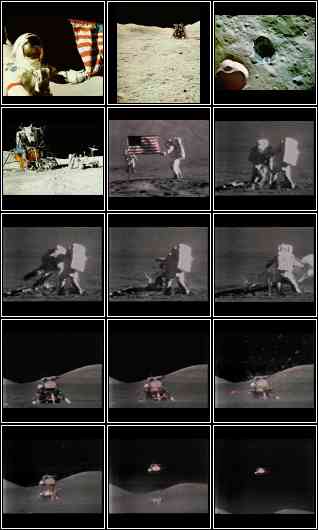
Windex can make it much easier to find an image in your collection. It scans a list of image files you specify on the command line and prepares an HTML document which contains an index of all those images with each shown as a small “thumbnail” view. A client-side image map is included which allows you to click on any image to display the full-size original image file or to download it to a file on your own computer. The image at right was created with windex from a collection of public domain NASA images from the Apollo 17 lunar mission; try clicking on one of the thumbnails to display the full image, then use your browser's Back button to return to this document.
This page describes, in Unix manual page style, a Perl program available for downloading from this site which automatically compiles a graphical index for a collection of bitmap images. Also included in the archive is an accompanying utility, windup, which scans a list of image directories and invokes windex to update indices for directories to which images have been added since the last index was prepared.
To use the program
you must have Perl
and the Netpbm
raster image toolkit installed on your machine. This program makes
extensive use of Unix facilities; it is improbable in the extreme that
it will work on non-Unix systems without major modifications.
windex - create a Web HTML index for a collection of images
windex [ options ] [ directory… ]
windex is a Perl script that takes a collection of image files and creates an HTML index which contains one or more index images showing small “thumbnail” views of the image files. The index document contains client side image maps which link each thumbnail to the original source image. Thus, you can browse a collection of images, click on any you wish to view full-size, then use the browser's “Back” button to return to the index or. optionally, have the full-size images open in a separate browser window. windex excludes files with names of the form it generates, so you can re-run it to update the index in a directory without first deleting the old index files.
windex determines the file format by the file name extension of the input files and then uses internal tables to look up the commands it needs to convert the images to the ppm format. Once in ppm format, windex uses various netpbm commands to create the index images. windex is particularly useful if you have lots of image files in all sorts of different formats and you want to create an index of all of them without converting them all to a common format first. Of course, if the image is in a format your browser can't display, you won't be able to view it by clicking its thumbnail.
Besides Perl, windex requires the Netpbm package. It should not be difficult to add filters to read other image formats as long as there is a way to translate them to the ppm format.
Switches that do not take arguments may be combined into a single switch with other switches: -abBlv. Switches that take arguments must be followed by their arguments with a space in between: -c 10 -r 5. The fancy way combine all these switches is: -abBlvc 10 -r 5. That is, you can combine the switches together in any way you like so long as the switches that take an argument are followed by said argument with a space in between. If you don't want to get fancy, just specify each switch by itself: -a -b -B -c 10 -l -r 5 -v.
In all cases in which a switch does not take an argument, -switch will turn the switch on, and +switch will turn the switch off. For example, -l will turn labels on, and +l will turn labels off. If a set of switches are combined into a single switch that leads with either a + or a -, the + or - affects all the switches in that set. If a switch that takes an argument is specified with a leading +, it is assumed that you meant -.
An argument of -- terminates the options list and signals the beginning of the file list.
Default settings of the options are equivalent to explicitly specifying “-a -B -i -S -u -w 120 -X 780 -x 120 -Y 780”.
If a file name has “.”s in it that do not come before a valid file format extension, the file will be skipped because windex will not be able to find decode commands in its internal tables.
When in automatic sizing mode (-a), if a processed image is larger than the specified dimensions of a sheet, this image will appear all by itself, and the index will be larger than you specified with -x and -y.
windex will fail if used on filenames that contain whitespace.
This program was adapted from the icontact contact sheet creation utility developed by:
Mark Hansonwho adds: “Bug reports, patches, suggestions, questions, and money are all welcome.”
icontact is: Copyright © 1992 Mark B. Hanson
windex is: Copyright © 1997, 2004, 2007, 2020 John Walker
Permission to use, copy, modify, and distribute this software and its documentation for any purpose and without fee is hereby granted, provided that both the above copyright notice and this permission notice appear in all copies and in supporting documentation. This software is provided “as is” without express or implied warranty.
windup - Update image index when images are added to directories
windup [options] directory…
windup is a Perl script which examines the list of directories given on the command line to determine, for each directory, whether one or more images have been added since the last time an index of images was created in the directory with windex. If the directory's index is out of date (or if it has never been indexed at all), windex is invoked to generate an up-to-date index.
perl(1), touch(1), windex(1)
windup judges an image index current if its last modification date is more recent than any image file in the directory. If you add images to a directory with a tool which preserves their original date and time, and that date is prior to that of the last index, windup will fail to discover that the new images have been added. If this happens, just touch any image in the directory to reset its last modification date and re-run windup. Alternatively, you can use the -a option to force windup to rebuild indices of all directories.
windup doesn't detect when an image is deleted from a directory. Until the index is rebuilt (by running windex manually or by using the -a option on windup) clicking on the deleted image's thumbnail in the index will generate a “document not found” error in the browser.

This software is utterly and absolutely unsupported. You are entirely on your own in using this program. If Netpbm or Perl is incorrectly installed or you're using an obsolete version, you will doubtless encounter errors which will require patience and experience with both Netpbm and Perl programming to resolve. Every attempt has been made to permit windex to be used as a black box, but if the box pops open and gears and springs fly out on your watch, I can't provide any assistance in setting things right.
 Download windex.tar.gz (gzipped TAR archive)
by John Walker