by John Walker
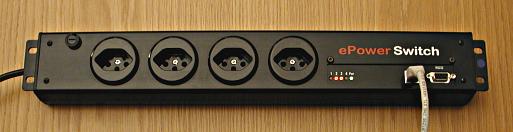
Every so often some wag starts a rumour about the imminent announcement of a new “Internet-ready” product for the home: an e-refrigerator that orders groceries on-line so you never run out of anything, an e-toaster that sends you an E-mail when the toast pops up, an e-toilet which…never mind. Well, here is an Internet-ready outlet strip, and it's not a joke. In fact, it's extremely handy in setting up a high-reliability site and implementing “lights-out” remote administration of data centres.
The Neol ePowerSwitch provides four independently-controllable outlets. It can be connected to any 10Base-T network with its built-in RJ-45 jack (after being initially configured via an RS-232 port), and controlled over a local network or the Internet with a Web browser which connects to its built in mini Web server. The outlet strip as a whole and each individual power socket are password protected to prevent malicious users from turning off equipment connected to it. (The power strip does not, however, support secure connections, so there's a risk of passwords being “sniffed” by third parties. Unless off-site control of the power strip is absolutely required, it's wise to block packets directed to it from the Internet at your firewall.)
While browser-based control is fine for interactive operation of the power strip, many potential applications require automated control by programs. You might, for example wish to switch equipment on and off according to a schedule, or have one or more machines on your network monitor the status of network hardware (modems, routers, firewalls, wireless access points, etc.) and power cycle components detected to have failed in order to reset them. Real system administrators prefer to accomplish such tasks with Perl programs. This page describes tools to assist in writing such programs.
The ePowerSwitch.pm Perl module implements an object-oriented interface to the ePowerSwitch, permitting either complete control over all four outlets or restricted control of a single outlet granted by its outlet-specific password. The ePowerSwitch program is a command-line application implemented in Perl which serves both as an example of a program using ePowerSwitch.pm, and as a stand-alone utility in its own right, suitable for interactive use or in applications implemented as shell scripts. Both the command line application and Perl module are described, in manual page format (extracted from the “pod” language documentation embedded in the Perl programs), in the following sections.
The ePowerSwitch Perl utilities may be downloaded from the following link:
ePowerSwitch.tar.gz: Gzipped TAR archive (13 Kb)
Included in the archive are the command line utility ePowerSwitch, the Perl module ePowerSwitch.pm, and manual pages for the two programs extracted from the documentation embedded within them. You can use these files in the directory in which you extracted them or install them in your system's library directories to make them available to all users.
ePowerSwitch [--copyright] [--help] [--host hostname] [--ip address] [--password password] [--port portno] [--socket socketno] [--verbose] [--version] command…
The ePowerSwitch is a TCP/IP compatible power strip with four outlets which can be controlled via HTTP requests to an embedded mini Web server. For details about the ePowerSwitch, see the manufacturer's site:
This program provides command-line control of an ePowerSwitch, operating it with the companion ePowerSwitch.pm Perl module, which you can use to directly control the switch from your own Perl programs. Options are used to specify the address (via IP address or host name) of the switch, and the password granting access to all sockets or a specific socket, followed by or more commands to query the status of the switch and/or turn sockets on or off.
All options may be abbreviated to their shortest unambiguous prefix.
Following the option specifications, one or more commands to query or change the status of the switch may be specified. Commands which pertain to a specific socket (for example, to turn it on or off) are followed by the socket number (from 1 to 4) to which they apply if the --password used to log into the switch was the global administration password granting access to all sockets. If the “user” password for a specific socket was specified along with a --socket option giving the socket number it governs, no socket number is specified after such commands. In the following command descriptions the notation “[socket]” is used to indicate these conditional socket number specifications.
 IP: 192.168.33.111  Port: 80
      Password: 'venona'
   Logged in.
   Switch name: Commrack1
   Socket 1: Firewall.2 On
   Socket 2: Firewall.3 On
   Socket 3: Hub-DMZ On
   Socket 4: Hub-LAN Off
If the “user” password for a specific socket is specified, only the state of that socket will be shown:
 IP: 192.168.33.111  Port: 80
      Password: 'venona2'  Socket: 2
   Logged in.
   Switch name: Commrack1
   Socket 2: Firewall.3 On
This is ePowerSwitch version 1.0, released on November 8th, 2003. The current version of this program is always posted at http://www.fourmilab.ch/webtools/ePowerSwitch/.
    John Walker
    http://www.fourmilab.ch/
This program operates the ePowerSwitch via the
ePowerSwitch.pm Perl module, which should be supplied with
it. If you're running this program from a library directory on
your PATH, the module must be installed in a location where
Perl can find it. The ePowerSwitch.pm module, in turn,
requires the LWP (“Library for the World Wide Web in Perl”)
module; if it isn't installed on your system, you can obtain
the current version from CPAN http://www.cpan.org/.
The term “socket” is used herein exclusively to refer to the outlets on the power strip into which you plug stuff, not network sockets, notwithstanding that the latter are used in the process of controlling the former.
Please report any bugs to bugs at fourmilab.ch
ePowerSwitch.pm Perl module.
This program is in the public domain.
    use ePowerSwitch;

    $eps = ePowerSwitch->new($ip_address, $port,
                             $password, $socket);
    $eps->login();
    $eps->logout();
    $are_we = $eps->loggedin();
    $ok = $eps->switch($socket_number, $command);
    $eps->describe($filehandle);
    $swname = $eps->switchname();
    $sockname = $eps->socketname($socket_number);
    $on_or_off = $eps->socketstat($socket_number);
    $vmode = $eps->verbose($mode);
The ePowerSwitch is a TCP/IP compatible power strip with four outlets which can be controlled via HTTP requests to an embedded mini Web server. For details about the ePowerSwitch, see the manufacturer's site:
This module provides an object-oriented interface to an ePowerStrip. A program can create one or more ePowerSwitch objects, each bound to a specific network-accessible switch (or an individual socket on a switch), and then query status and switch power on and off with method calls.
new method is the constructor for the
ePowerSwitch class. It creates a new ePowerSwitch
with IP address $ip_address and port $port. You
can create an ePowerSwitch object to access all outlets
on the switch by specifying the administration password for
$password and 0 for $socket (or omitting the
$socket argument), or to access a single socket by
supplying the “user” password for that socket and its
socket number (1 through 4) as $socket. The
constructor returns a new ePowerSwitch object which may
be manipulated through the following methods.
$password
and $socket given when the object was created with new).
You must log in before using any methods which query the status
of the switch or turn sockets on or off. Returns 1 if the login
was successful, 0 if the login failed.
$command argument, to socket $socket_number. If
you created the ePowerSwitch with the administrative
password, $socket_number can be any socket (1
through 4). If you gave the password for a single
socket in the call to new, the $socket_number
must be the same as the $socket specified
in the new call.
Commands are as follows:
'0'
'1'
't'
'r'
switch method returns immediately—it does not wait
until the socket is turned back on.
The switch method returns 1 if the command was executed
normally and 0 if an error occurred.
$filehandle or, if $filehandle is
omitted, STDOUT. (If you want to print the status on a
filehandle OFILE, pass a reference to it:
describe(\*OFILE).) The arguments used to create the object
with new are shown, then the login status. If logged in to
the switch, its name, and the name and on/off status of each of
the sockets is shown if logged in with the administrative
password. If logged in with the password for a single socket,
only the status of that socket is shown.
$socket_number (1 through 4). You must be logged in;
if logged in with the administrative password, you may
obtain the name of any socket. If logged in with the password
for a single socket, only the name of that socket may
be retrieved.
$socket_number is on, 0 if
it is off. You must be logged in to query the socket
status. If logged in with the administrative password, you
can query the status of any socket (1 through 4); if logged
in with the password for a specific socket, only that
socket's status may be obtained.
die to report the error.) If you set verbose mode by
calling verbose with a nonzero $mode argument, diagnostic
messages will be printed on standard output for all operations,
successful or not. The previous setting of verbose mode
is returned, permitting you to save and restore it
This is ePowerSwitch version 1.0, released on November 8th, 2003.
    John Walker
    http://www.fourmilab.ch/
This module requires the LWP (“Library for the World Wide Web in Perl”) module; if it isn't installed on your system, you can obtain the current version from CPAN.
The term “socket” is used herein exclusively to refer to the outlets on the power strip into which you plug stuff, not network sockets, notwithstanding that the latter are used in the process of controlling the former.
Please report any bugs to bugs at fourmilab.ch
ePowerSwitch command line utility.
This program is in the public domain.
November, 2003
Documentation updated: July, 2017